Introduction to Unraid® Plugins
Unraid® is a registered trademark of Lime Technology, Inc. This documentation is not affiliated with Lime Technology, Inc.
Extend your Unraid® server with custom functionality.
What is an Unraid® Plugin?
An Unraid® plugin is an extension that adds functionality to your Unraid® server. Plugins can:
- Add new pages to the web UI
- Install additional software packages
- Add background services and scripts
- Respond to system events (array start/stop, Docker events, etc.)
- Integrate with Docker and VM management
- Provide settings pages for configuration
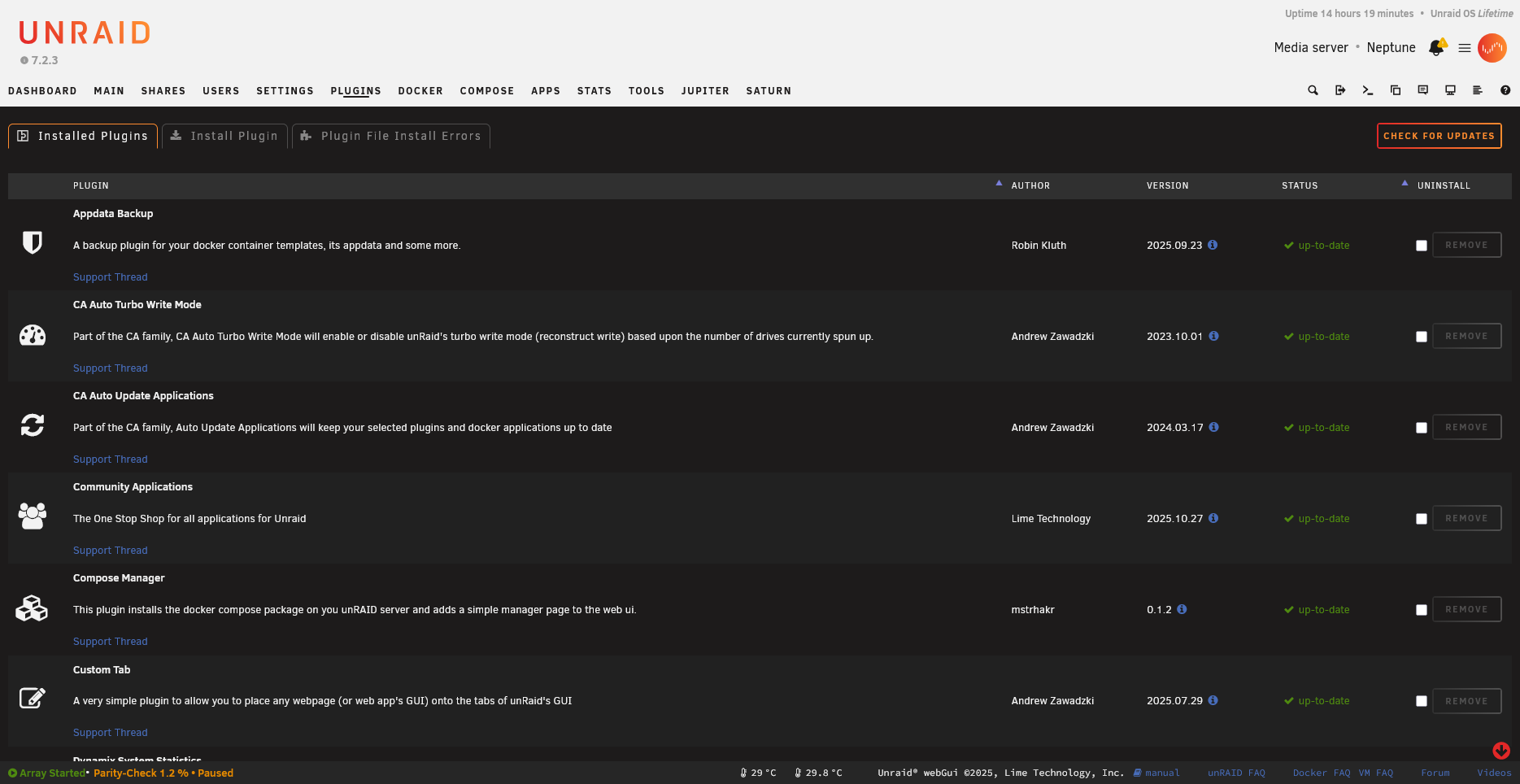
Each plugin row shows the name, version, and available actions:
How Plugins Work
The Unraid plugin system is built on top of Slackware’s package management. When you install a plugin:
- The
.plgfile is downloaded and processed - Any required packages (
.txzfiles) are downloaded and extracted - Install scripts are executed
- The plugin is registered as “installed”
- On every reboot, installed plugins are automatically reinstalled
⚠️ Important: Unraid runs from RAM. The only persistent storage is the USB flash boot device. This is why plugins must be reinstalled on every boot.
Plugin vs Docker Container
Before creating a plugin, consider whether your use case is better suited to a Docker container:
| Use Plugin When | Use Docker When |
|---|---|
| Modifying the Unraid web UI | Running isolated applications |
| Deep system integration needed | Standard server software (Plex, etc.) |
| Responding to Unraid events | Software with complex dependencies |
| Installing kernel modules | Want easy updates/rollbacks |
| Very lightweight additions | Application doesn’t need system access |
Many developers use a combination: a plugin that manages Docker containers (like the Compose Manager plugin).
Anatomy of a Plugin
A complete plugin typically consists of:
1. The PLG File (myplugin.plg)
An XML file that defines:
- Plugin metadata (name, version, author, URLs)
- Files to download
- Installation scripts
- Removal scripts
2. The Package (myplugin-package.txz)
A Slackware-format package containing:
- Web UI pages (
.pagefiles) - PHP scripts
- Shell scripts
- CSS and JavaScript
- Event handlers
- Default configuration
3. Configuration Storage
Plugin configuration is typically stored in:
/boot/config/plugins/myplugin/myplugin.cfg
This persists across reboots because it’s on the USB flash drive.
File Locations
Understanding where files live is crucial:
On USB Flash (Persistent)
/boot/config/plugins/
├── myplugin.plg              # The plugin installer
└── myplugin/
    ├── myplugin.cfg          # User configuration
    ├── myplugin-package.txz  # The plugin package (optional caching)
    └── [other cached files]
In RAM (Rebuilt on Boot)
/usr/local/emhttp/plugins/myplugin/
├── myplugin.page             # Main UI page
├── myplugin.settings.page    # Settings page
├── default.cfg               # Default configuration values
├── README.md                 # Shown in "Plugins" page
├── php/
│   └── [PHP files]
├── scripts/
│   └── [Shell scripts]
├── event/
│   ├── started               # Runs when array starts
│   └── stopping_docker       # Runs before Docker stops
└── [other resources]
Plugin Registration
/var/log/plugins/myplugin.plg # Symlink indicating plugin is installed
The Installation Process
When plugin install myplugin.plg runs:
flowchart TD
    A["1️⃣ Parse myplugin.plg"] --> B["2️⃣ Process each FILE element"]
    B --> B1["Download files from URLs"]
    B --> B2["Verify MD5/SHA256 checksums"]
    B --> B3["Extract packages with upgradepkg"]
    B --> B4["Run inline scripts"]
    B1 & B2 & B3 & B4 --> C["3️⃣ Copy .plg to /boot/config/plugins/"]
    C --> D["4️⃣ Create symlink in /var/log/plugins/"]
    D --> E["5️⃣ Plugin is now active! ✅"]

    style A fill:#4a9eff,color:#fff
    style E fill:#4caf50,color:#fff
What You’ll Learn
This documentation will guide you through:
- PLG File Structure - How to write the plugin installer
- Page Files - Creating the web UI
- Event System - Responding to system events
- Packaging - Building distribution packages
- Best Practices - Tips from experienced developers
Working Example: DocTest Validation Plugin
This repository includes a complete, working validation plugin that demonstrates all documented features. You can:
- View the source code - See how a real plugin is structured
- Install it on your server - Test documented features live
- Check validation results - See what we’ve verified against Unraid
The DocTest plugin validates:
- All 16 documented event handlers
parse_plugin_cfg()andmk_option()functions$vararray properties- Page file rendering and form handling
- Notification system integration
Next Steps
Ready to build your first plugin? Continue to Your First Plugin for a hands-on tutorial.
Learning Resources
The best way to learn Unraid plugin development is to study existing plugins:
System Scripts
The /usr/local/sbin/ directory contains many Unraid system scripts that demonstrate patterns:
emhttp_event- How events are dispatched to pluginsnotify- Notification system internals- Various utility scripts
Reference Plugins
- Dynamix plugins - Official Unraid plugins (the reference implementation)
- Community Applications - Complex PHP patterns
- Compose Manager - Docker Compose integration example
Community Resources
- Unraid Forums - Plugin Support - Get help from the community
- Unraid Forums - Programming - Technical discussions
Key Forum Threads
These foundational posts contain detailed plugin development information:
- How does the plugin system work? - Comprehensive PLG structure guide
- Plugin System Documentation - Links to essential resources